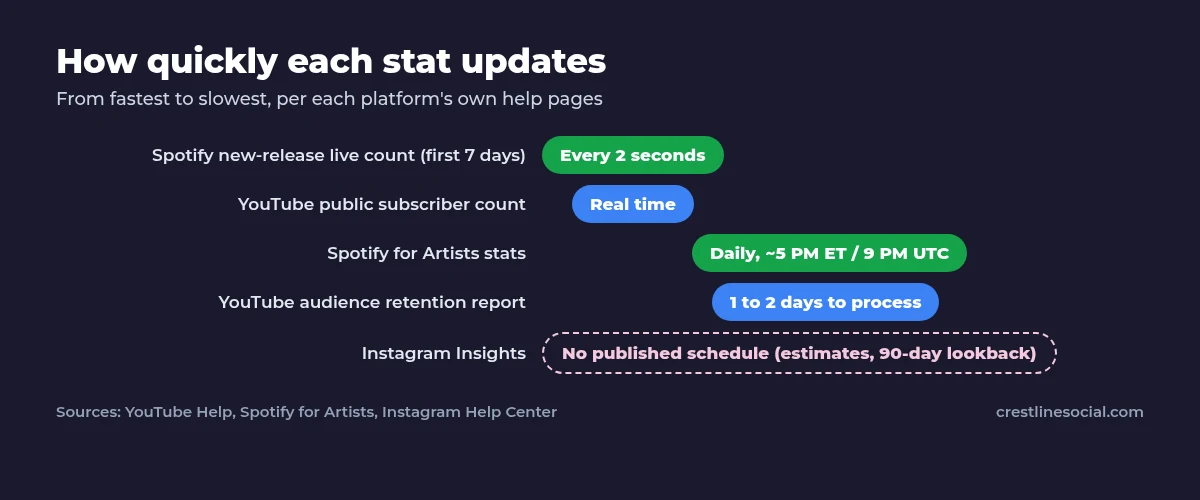
Each platform updates its stats on its own schedule. YouTube’s public subscriber count updates in real time, while YouTube Analytics reports take time to process and can differ slightly from the public count. Spotify for Artists updates once a day at about 5 PM ET (9 PM UTC), with a live stream counter for the first 7 days of a release. Instagram doesn’t publish a fixed update schedule for Insights. It describes the figures as estimates and lets you look back up to 90 days.
Key points
- YouTube public subscriber count: real time (shown abbreviated once you pass 1,000).
- YouTube audience retention: typically 1 to 2 days to process.
- Spotify for Artists: daily, at about 5 PM ET / 9 PM UTC. Days are counted in UTC.
- Instagram Insights: no published refresh time. Some metrics are labelled estimated and in development.
How often do YouTube stats update?
| YouTube stat | Update timing (per YouTube Help) |
|---|---|
| Public subscriber count | Real time, abbreviated above 1,000 |
| Audience retention report | Typically 1 to 2 days to process |
| Finalized revenue in Analytics | Once payments reach AdSense for YouTube, typically between the 7th and 12th of the following month |
YouTube Analytics also has a Realtime report on the Overview tab for a near-live view of recent activity. Small differences between the public count and Analytics are normal because they update at different speeds. YouTube also removes spam and closed accounts from subscriber counts, so a count can dip without anyone actively unsubscribing.
Why is my YouTube view count lower than expected?
YouTube’s fake engagement policy says it doesn’t count views it identifies as artificial. Legitimate views are counted when a video starts to play, but the platform keeps checking traffic quality. That is one reason counts can be revised.
How do I check my YouTube stats on desktop and mobile?
Desktop
- Sign in to YouTube Studio and select Analytics for the channel, or open a video’s Analytics from Content.
- Use the Overview tab’s Realtime card for recent activity.
Mobile
- Open the YouTube Studio app.
- Tap Content, choose a video and tap the Analytics card, or open channel analytics from the app’s main screen.
For a quick public snapshot without signing in, use our YouTube subscriber count tool.
How often do Instagram Insights update?
Instagram’s help center doesn’t give a fixed refresh time for Insights. Here is what it does say:
- Insights are available for public accounts and cover account-level trends as well as individual posts, Stories, Reels and live videos.
- You can choose a preset or custom timeframe within the past 90 days.
- Follower trends (growth, top locations, age range and most active times) appear once you have at least 100 followers.
- Some metrics, such as Views and Viewers, are described as “estimated and in development” and may not be available to everyone yet.
In practice, check Insights a day or two after posting rather than minute by minute. If your follower number looks wrong during an outage, see is Instagram down or is it just me. To track growth over weeks, read how to track Instagram follower growth.
How often do Spotify for Artists stats update?
| Spotify stat | Update timing (per Spotify for Artists) |
|---|---|
| Overall stats | Once a day, at about 5 PM ET / 9 PM UTC |
| New release live count | Updates every 2 seconds for the first 7 days |
| Day boundaries | Counted in UTC (can’t be changed) |
| Streams from downloaded music | Counted when the listener goes online (at least every 30 days) |
Because Spotify counts days in UTC, a release that goes out in the evening in North America may show no stats for its “release day”. By then it is already the next day in UTC. More on what these numbers mean in Spotify monthly listeners and streams explained.
Why do stats look different in different places?
- Different refresh speeds. A public counter may update instantly while the analytics dashboard lags.
- Time zones. Spotify for Artists uses UTC days, and dashboards may group days differently from your local time.
- Filtering. YouTube removes spam accounts and artificial views, and Spotify only counts streams of at least 30 seconds.
- Estimates. Instagram marks some Insights metrics as estimated.
Waiting on numbers to move? Our YouTube subscribers packages show up in Studio within the usual update window.
Sources
- YouTube Help: Subscriber count updates
- YouTube Help: Fake engagement policy
- YouTube Help: Audience retention
- YouTube Help: Get started with YouTube Analytics
- Instagram Help: About Instagram insights
- Spotify for Artists: When stats update
- Spotify for Artists: How your streams are counted
FAQ
How often does YouTube update subscriber counts?
The public subscriber count updates in real time, though it is abbreviated above 1,000. YouTube Analytics data takes time to process, so it can differ slightly from the public count. Use the Realtime report for a near-live view.
Why don’t YouTube Studio and my channel page show the same number?
They update at different speeds, and YouTube removes spam and closed accounts from counts. Small differences are normal.
What time do Spotify for Artists stats update?
Once a day, at about 5 PM ET (9 PM UTC). New releases also get a live stream count for their first 7 days.
How often does Instagram update Insights?
Instagram doesn’t publish a fixed schedule. Insights cover up to the past 90 days, and some metrics are labelled as estimates.
Why are my stats missing for release day on Spotify?
Spotify counts days in UTC. If you release in the evening in North America, it may already be the next day in UTC.