Instagram keeps photos at full resolution when they are between 320 and 1080 pixels wide and have an aspect ratio between 1.91:1 (landscape) and 3:4 (portrait). For a 1080-pixel-wide image, that means a height between 566 and 1440 pixels. Narrower photos are enlarged to 320 pixels wide, wider ones are reduced to 1080, and other aspect ratios are cropped.
Key points
- Upload at 1080 pixels wide for the best quality.
- Supported aspect ratios run from 1.91:1 (landscape) to 3:4 (portrait).
- At 1080 wide: landscape 1080 × 566, square 1080 × 1080, portrait 4:5 at 1080 × 1350, tallest portrait 1080 × 1440.
- Instagram doesn’t publish an official profile picture size. Upload a square image with the subject centered for the circular crop.
- Stories and Reels are full-screen 9:16. Meta’s ad specs (not an organic-post rule) recommend 9:16 for these placements, which is 1080 × 1920 at 1080 wide.
What size should an Instagram post be?
Upload at 1080 pixels wide, using an aspect ratio Instagram supports. According to Instagram’s help center, photos between 320 and 1080 pixels wide keep their original resolution as long as the aspect ratio is between 1.91:1 and 3:4.
| Shape | Aspect ratio | Size at 1080 px wide |
|---|---|---|
| Landscape (widest supported) | 1.91:1 | 1080 × 566 |
| Square | 1:1 | 1080 × 1080 |
| Portrait (common choice) | 4:5 | 1080 × 1350 |
| Portrait (tallest supported) | 3:4 | 1080 × 1440 |
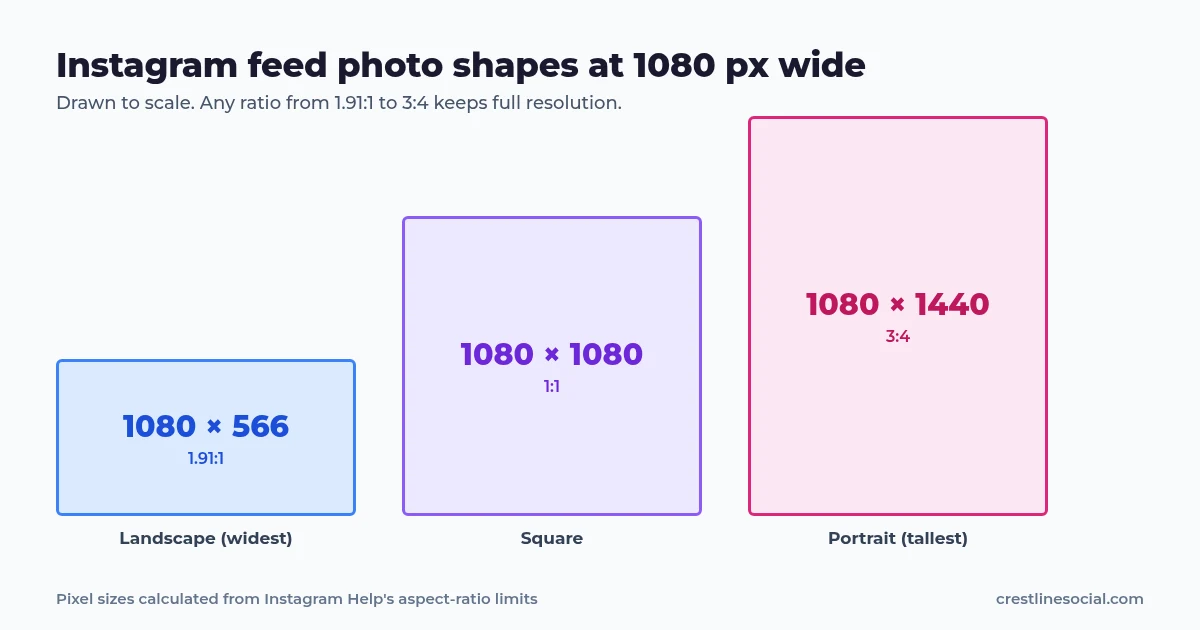
4:5 (1080 × 1350) sits inside Instagram’s supported range and is the ratio Meta’s Ads Guide recommends for Instagram Feed image ads. Meta’s ad spec suggests 1440 × 1800 for ads, but for an organic post Instagram stores feed photos at no more than 1080 wide, so 1080 × 1350 is enough. Note that these Meta figures are ad specifications, not a rule for regular posts.
What happens if my photo is smaller or larger?
| Your image | What Instagram does |
|---|---|
| Narrower than 320 px | Enlarges it to 320 px wide |
| 320 to 1080 px wide, supported ratio | Keeps the original resolution |
| Wider than 1080 px | Reduces it to 1080 px wide |
| Ratio outside 1.91:1 to 3:4 | Crops it to a supported ratio |
Upscaling small images makes them look soft, so export at 1080 wide if you can. Uploading a much larger file doesn’t add any sharpness, because Instagram scales it down to 1080 anyway.
How do I make sure my photo isn’t cropped?
On mobile
- Edit or export the image at a 1:1, 4:5-style portrait or landscape ratio within the supported range.
- In the Instagram post flow, tap the crop or expand icon to switch between the original shape and a square crop.
- Check the preview before sharing. What you see there is what gets posted.
On desktop
- In your editor, set the canvas to 1080 px wide and a height between 566 and 1440 px.
- Export as JPG or PNG.
- On instagram.com, click Create, upload the image and use the crop options to keep the original shape.
What is the Instagram profile picture size?
Instagram’s help center explains how to add or change a profile picture, but it doesn’t publish an official size. The picture is displayed as a circle and appears small in most places. Practical advice:
- Use a square image so nothing important falls outside the circle.
- Keep the face or logo in the center, with some margin around it.
- Use a reasonably high-resolution image. The 320 px minimum that applies to posts is a sensible floor, and more resolution helps on high-density screens.
- Avoid fine text. It becomes unreadable at small sizes.
To see how any public account’s current profile photo looks, use our Instagram profile picture viewer.
How do I change my Instagram profile picture?
On mobile
- Go to your profile and tap Edit profile.
- Tap the option to edit your picture.
- Choose a new photo or take one, then position it inside the circle.
- Save the change.
On desktop
- Go to your profile on instagram.com.
- Click your profile picture.
- Choose the upload option and select a file.
What about Stories and Reels?
Instagram’s image resolution help page covers feed photos only. Stories and Reels are full-screen vertical formats. Meta’s Ads Guide recommends a 9:16 ratio for Instagram Stories and Reels ads (1440 × 2560 for ads; 1080 × 1920 is the same shape at 1080 wide). That is an ad specification, but it matches the full-screen shape regular Stories use. Meta also suggests keeping about 14% at the top, 35% at the bottom and 6% on each side free of text and logos so the interface doesn’t cover them. Always check the in-app preview before posting.
Once your sizes are right, the next thing that affects reach is discovery. See how Instagram discovery works and our hashtag generator (Instagram allows up to 5 hashtags per post).
Once your posts look right, our Instagram likes packages can help them reach more people.
Sources
- Instagram Help: Image resolution of photos you share
- Instagram Help: Add or change your profile picture
- Instagram Help: Hashtags
- Meta Ads Guide: Instagram Feed image specs (ad specification)
- Meta Ads Guide: Instagram Stories image specs (ad specification)
FAQ
What is the best size for an Instagram post?
1080 pixels wide at a supported aspect ratio: 1080 × 1080 for square, up to 1080 × 1440 for portrait (3:4), and down to 1080 × 566 for landscape (1.91:1).
What aspect ratios does Instagram support for photos?
From 1.91:1 landscape to 3:4 portrait. Images outside that range are cropped.
Does Instagram reduce photo quality?
Images wider than 1080 pixels are reduced to 1080, and images narrower than 320 pixels are enlarged. Uploading at 1080 wide avoids both.
What is the official Instagram profile picture size?
Instagram doesn’t publish one. Use a square, centered, high-resolution image, because the profile photo is shown as a small circle.
What size are Instagram Stories?
Instagram’s photo-size help page doesn’t list an official Stories size. Stories are full-screen 9:16, which is 1080 × 1920 at 1080 wide. Meta’s ad specs use the same 9:16 ratio. Check the in-app preview before posting.